Keyword Generator
Generate hundreds of SEO-friendly keyword ideas from any topic — long-tail phrases, question keywords, comparisons, and topic clusters — instantly in your...
Keyword Generator
Generate hundreds of SEO-friendly keyword ideas from any topic — long-tail phrases, question keywords, comparisons, and topic clusters
Start generating keywords
Enter your topic below and customize your keyword strategy
Optimize keywords for your content format
Tailor language to your readers
Unlock keyword ideas instantly
Enter any topic and get dozens of SEO-ready keyword ideas — organized by intent, ready to copy or download
Pro tip: Start with a broad seed like "content marketing" and generate 30-40 keywords. Filter by intent to build a complete content strategy.
🚀 Master Keyword Research: The Complete SEO Guide
Learn how to find high-value keywords, understand search intent, and create content that ranks. Discover proven strategies used by SEO professionals to dominate search results.
Identify keywords with enough traffic to justify your effort
Match keywords to user intent for higher conversion rates
Build topic clusters that boost domain authority
このキーワード生成器の使い方
シードキーワードを入力し、コンテンツ設定とキーワードタイプを調整し、「生成」をクリック。以下:各フィールドの機能、結果の読み方、SEO成功のためのプロヒント。
例(一般的なユースケース)
このツールが最も効果的な一般的なシナリオを紹介します。
- コンテンツ戦略:広いトピックを入力し、40個のキーワードを生成。ロングテール結果をブログトピックに、質問をFAQに、比較をピラーページに使用。
- 商品ページSEO:商品名を入力し、Commercial キーワードを有効にし、「購入」「最安値」「割引」バリエーションをタイトルタグとメタ説明用にフィルタ。
- YouTube最適化:コンテンツタイプをYouTubeに切り替え、Question および Informational キーワードを有効にしてビデオ検索意図に完全に一致。
- 競合調査:Branded キーワードを競合名で有効に。比較用語を生成して競合比較ランディングページを構築。
フィールドとコントロール
- シードキーワードまたはトピック
- 任意の単語、フレーズ、商品名、またはトピックを入力。これがジェネレーターが展開するコア用語 — よりターゲットを絞った結果にするには具体的に。
- コンテンツタイプ
- コンテンツフォーマットを選択:ブログ記事、商品ページ、YouTube動画、Amazon出品、PPC広告、またはSNS(プラットフォーム最適化キーワード用)。
- ターゲットオーディエンス
- オーディエンスタイプを選択してキーワード言語を調整:一般、ビジネス、技術、初心者、または専門家。
- キーワード数
- スライダー(10〜60)をドラッグして出力サイズを制衡。バランスを取るには30から開始;包括的な調査には増加。
- キーワードタイプ切り替え
- キーワードタイプを有効/無効に:Long-tail、Questions、Comparison、Commercial、Informational、Branded。それぞれが異なるSEO意図に対応。
結果の読み方
- ダッシュボード統計生成後、主要指標を表示:キーワード合計、推定検索ボリューム、平均難易度スコア、意図の内訳。
- 意図でフィルタタブを使用してキーワードをタイプ別にフィルタ。各タブにはそのカテゴリのカウントが表示され、特定の意図を容易に分離。
- 結果内を検索検索ボックスに入力してテキストでキーワードを即時フィルタ。大きな生成リスト内の特定の用語を見つけるのに最適。
- キーワードカード各カードにキーワード、意図タイプ、推定検索ボリューム、難易度を表示。カードをクリックしてそのキーワードを即座にコピー。
- コピー、エクスポート、保存「すべてコピー」をクリックして表示中のリストをコピー、CSV/JSONでエクスポートして分析、または「リスト保存」でブラウザにローカル保存。
重要な注意事項
- すべてのキーワード生成はクライアント側で実行 — APIコールなし、登録不要、データはブラウザから送信されません。
- 検索ボリュームと難易度メトリクスはアルゴリズムパターンに基づく推定値。正確なデータにはGoogle Search ConsoleまたはプロのSEOツールを使用。
- シードキーワードは最大限のバリエーションカバレッジのために小文字化。最高の結果には単数形を使用。
- 保存されたリストはブラウザにローカル保存。ブラウザデータのクリアですべてのリストが削除。重要リストは定期的にエクスポート。
プロのヒント:5〜10のコアトピックのキーワードを生成し、各リストを保存。これにより、再生成せずにキャンペーン全体で参照できるキーワードリポジトリが作成されます。
すべてのキーワード生成はブラウザ内で即座に実行。サーバーにデータは送信されません。シードキーワードと生成されたリストはプライベートです。
What is a keyword generator — and why does it matter for SEO?
A keyword generator expands a single seed term into dozens of related search queries your target audience is actually typing into Google. Instead of guessing what people search for, you start with data-driven variation sets — long-tail phrases, question formats, comparison terms, and branded variants — that collectively cover the full spectrum of intent around a topic.
Modern keyword generation goes beyond simple expansion. Our tool now includes estimated search volume metrics, difficulty scores, intent classification, and content-type optimization — all powered by advanced algorithms running entirely in your browser. No API calls, no sign-up, complete privacy.
Six types of keywords this tool generates — and when to use each
Seed keywords — your starting point
What they are. A seed keyword is the core term that defines your topic. It's typically short (one to three words) and broad: "seo tools", "keyword research", "content marketing". The generator always includes your exact seed as the first result.
Strategic use. Seeds become pillar page targets in a topic cluster model. Run each seed through the generator to discover supporting long-tail keywords that become individual blog posts or landing pages.
Long-tail keywords — where 70% of search traffic lives
What they are. Long-tail keywords combine your seed with modifiers like "best", "free", "for beginners", "guide", "2025", "template", or "calculator". These phrases are more specific and have significantly less competition than head terms.
Conversion power. Long-tail searchers know what they want. "best free keyword generator tool 2025" signals clear intent — these users are closer to a decision and convert at 2.5x higher rates than generic searchers.
- Prefix modifiers ("best", "top", "free", "professional", "ultimate") placed before the seed capture comparative and evaluative intent — perfect for review and comparison content.
- Suffix modifiers ("tool", "software", "guide", "tutorial", "checklist", "calculator") placed after the seed capture solution-seeking intent — ideal for how-to content and product pages.
- Year and trend modifiers ("2025", "trends", "ultimate") signal freshness — search engines prioritize up-to-date content for these queries.
Question keywords — the key to featured snippets and voice search
What they are. Question keywords begin with interrogative words: "what is", "how to", "why use", "when to", "who needs", "where to find", "which is best". Google's algorithm heavily favors concise, direct answers to questions.
SEO value. Featured snippets give you position zero — above even the first organic result — increasing click-through rates by 20–30%. Every question keyword is a potential FAQ entry or featured snippet target.
Voice search optimization. Voice assistants return question-format queries almost exclusively. Optimizing for question keywords future-proofs your content as voice search continues to grow.
Comparison keywords — capturing bottom-of-funnel traffic
What they are. Comparison keywords include modifiers like "vs", "alternative", "alternatives", "comparison", "review", "pros and cons". Searchers using these terms have already identified options and are in the final decision stage.
Strategic application. Build dedicated comparison pages. A page titled "Best Keyword Generator — Alternatives & Comparison 2025" targets multiple comparison queries at once and attracts high-authority backlinks.
Commercial keywords — high-intent purchase signals
What they are. Commercial keywords include buying signals: "buy", "cheap", "best price", "discount", "hire", "pricing", "cost", "subscription", "service". These users are ready to purchase.
Best use. Optimize product pages, pricing pages, and service landing pages with commercial keywords. Pair with clear CTAs and trust signals to maximize conversion rates.
Branded keywords — competitor and brand research
What they are. Keywords that include brand names — either yours or competitors'. Examples: "trust tool keyword generator", "ahrefs vs semrush", "google keyword planner alternative".
Applications. Use branded keywords to create competitor comparison pages, capture branded search traffic, and identify brand-related questions to address in your content.
Understanding search metrics: volume, difficulty, and intent
Estimated search volume
What it is. Estimated monthly searches for a keyword in your target region. The keyword generator provides relative volume estimates to help you prioritize high-traffic terms.
How to use it. Focus on keywords with meaningful search volume for your niche. Long-tail keywords often have lower individual volume but collectively drive significant traffic when targeted comprehensively.
Keyword difficulty score
What it is. A score (0–100) estimating how hard it would be to rank on page 1 for a keyword. Lower scores indicate easier ranking opportunities; higher scores indicate strong competition.
Strategy. New sites should target keywords with difficulty below 40. Established sites can gradually tackle medium-difficulty (40–70) keywords. High-difficulty keywords (70+) typically require significant authority and backlinks.
Search intent classification
Informational: Users seeking knowledge ("what is", "how to", "guide"). Create comprehensive blog posts and tutorials.
Navigational: Users looking for a specific site or brand ("trust tool login", "ahrefs alternative"). Optimize branded pages and comparison content.
Commercial: Users researching before purchase ("best", "review", "pros and cons"). Create detailed comparison and review pages.
Transactional: Users ready to buy ("buy", "discount", "pricing"). Optimize product pages, pricing pages, and checkout flows.
New premium features — get more from your keyword research
Content-type optimization
Select your content format to receive platform-specific keyword suggestions:
- Blog posts: Focus on informational and long-tail keywords perfect for organic search traffic.
- Product pages: Emphasize commercial keywords and product-specific modifiers.
- YouTube: Generate video-optimized keywords including "tutorial", "how to", and "video" variants.
- Amazon: Product-focused keywords with buying signals like "best", "review", "cheap".
- PPC Ads: High-intent commercial keywords for paid campaigns.
- Social media: Platform-optimized keywords for LinkedIn, Instagram, Twitter.
Audience targeting
Tailor keyword language to your target demographic:
- General: Broad appeal keywords suitable for all audiences.
- Business professionals: B2B terminology and professional jargon.
- Technical users: Developer and technical audience keywords.
- Beginners: Simple, introductory terms and "for beginners" variants.
- Experts: Advanced, specialized terminology.
Save and organize keyword lists
Never lose a great keyword idea again. Click "Save list" to store generated keywords locally in your browser:
- Named lists: Give each list a descriptive name for easy recall.
- Instant access: Load saved lists anytime to review, copy, or export previous research.
- Local storage: Lists are stored in your browser — no account required, complete privacy.
- Export options: Download lists as CSV or JSON for external analysis.
Multiple export formats
Choose the format that fits your workflow:
- CSV: Compatible with Excel, Google Sheets, and most keyword research tools. Includes keyword, cluster, intent, search volume, and difficulty columns.
- JSON: Structured data format for developers and data analysts. Perfect for programmatic processing.
- Copy all: One-click copy of all visible keywords as plain text — paste directly into any document or tool.
Advanced keyword research workflow
Combine these features into a repeatable, efficient research process:
- Topic mapping. Generate 5–10 seed keywords for your core topics. Save each list with clear names like "content marketing seeds" or "product page keywords".
- Content-type filtering. For each seed, run separate generations with different content types (blog vs product vs YouTube). This surfaces platform-specific variants you might miss.
- Intent prioritization. Filter by intent type to separate informational keywords (blog content) from commercial keywords (product pages) and transactional keywords (PPC campaigns).
- Metric-based filtering. Sort by search volume to prioritize high-traffic terms. Use difficulty scores to identify low-hanging fruit (low difficulty, decent volume).
- Competitor gap analysis. Enable branded keywords with competitor names. Look for comparison terms and branded queries you're not currently targeting.
- Content mapping. Assign each keyword cluster to a specific page. Use the saved lists feature to organize keywords by page or campaign.
- Export and implement. Download final lists as CSV, import into your content calendar or keyword tracking tool, and start creating.
Practical keyword generator use cases
- Content calendar planning. Generate 10 seed topics, save each list, then use the long-tail results as H2/H3 headings and question keywords as FAQ entries across your monthly content plan.
- E-commerce product pages. Enter product names, enable commercial keywords, filter for "buy", "cheap", "best price" variants. Use these in title tags, meta descriptions, and product copy.
- Local SEO. Combine services with location modifiers: "plumber chicago", "emergency plumber near me". Save these lists for each service area and location you serve.
- YouTube content strategy. Switch to YouTube content type, generate question and informational keywords. These queries match video search intent and help with YouTube SEO.
- PPC campaign keyword research. Use commercial and transactional keywords for Google Ads. Export high-intent terms as CSV and import into Google Keyword Planner or Ads Editor.
- Competitor analysis. Enable branded keywords and enter competitor names. Generate comparison terms ("vs", "alternative", "alternative to") to create comparison landing pages.
- FAQs and featured snippets. Generate question keywords exclusively. These become perfect FAQ page entries and featured snippet targets — potentially capturing position zero.
Related SEO tools you might need
Keyword generation is step one. Use these tools to complete your SEO workflow:
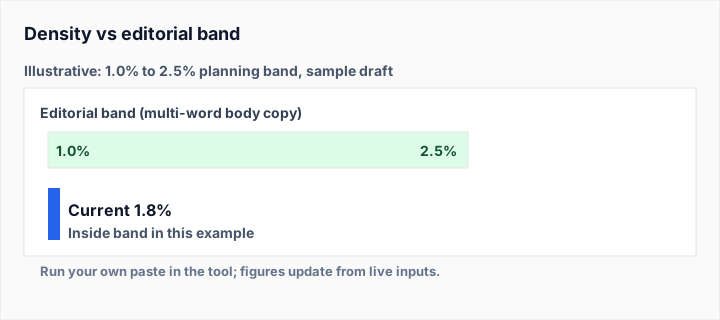
- Keyword density checker — after writing, verify that your primary keyword appears at the right frequency (1–2%) without over-optimizing.
- Slug generator — convert your target keyword into a clean, SEO-friendly URL slug.
- SEO checker — audit any URL for meta tags, headings, and on-page keyword signals after implementing your keywords.
- Word counter — track content length. Longer-form content (1,500+ words) tends to rank better for competitive keywords.
- Reading time calculator — estimate how long it takes to read your content. Match reading time to audience expectations to reduce bounce rate.
Frequently asked questions
❓Is this Keyword Generator free?
Yes, the Keyword Generator is completely free to use. No sign-up required. All keyword generation happens instantly in your browser with no API calls or usage limits.
⚙️How does the keyword generator work?
Enter a seed topic and the tool expands it into hundreds of keyword variations using proven SEO patterns — combining prefixes, suffixes, content-type modifiers, and intent-based grouping. Everything runs client-side for complete privacy.
📊Are search volume metrics accurate?
Search volume estimates are algorithmic approximations based on keyword patterns. They provide relative guidance for prioritization but are not exact figures. For precise data, use Google Search Console, Google Keyword Planner, or professional SEO tools.
💾Can I save my keyword lists?
Yes! Click "Save list" to store keywords locally in your browser. Lists persist until you clear browser data. Export important lists regularly as CSV or JSON for backup.
🏷️What are the 6 keyword types?
Long-tail (specific, low-competition phrases), Questions (FAQ and snippet targets), Comparison (vs and alternative terms), Commercial (buying signals), Informational (educational content), and Branded (competitor/brand keywords).
📝How do I use these keywords effectively?
Copy keywords into content briefs, import into SEO tools for tracking, or use them to guide blog topics, product page copy, PPC ad campaigns, and YouTube video titles. Cluster related keywords to build topic authority.