BMI Calculator
Use your height and weight to get a clear BMI snapshot and healthy-range context, helping you spot potential risk early and take practical next steps.
BMI formula
How to use this BMI calculator
Choose unit system first, enter measured weight and height, then read BMI, category, healthy-weight band, and charts before acting on the result.
Example (realistic defaults)
These match typical adult screening inputs; your Reset button restores locale-appropriate sample values.
- Metric: 72 kg at 175 cm → BMI ≈ 23.5 (healthy-weight band).
- Imperial: 160 lb at 69 in → converts to the same order of magnitude; always verify unit mode before comparing numbers.
Fields and controls
- Unit system
- Switch Metric or Imperial before entering values so conversion and ranges stay consistent.
- Weight and height
- Use measured values, not guesses. Small height errors can shift BMI materially in either direction.
- Age slider
- Age frames interpretation and AI wording; it does not change the core BMI formula for adults.
- Reset and AI review
- Reset restores locale-typical sample values. AI Deep Review runs only when you click ANALYZE with AI.
Reading results
- KPI row:BMI score, category, healthy range, and delta to healthy target.
- Dashboard charts:Category placement and sensitivity curve as weight shifts.
- AI review:Optional Gemini summary—run on demand for risk framing and cautions.
Important checks
- BMI is a screening metric, not a direct body-fat measurement.
- High muscle mass, edema, pregnancy, and age-related composition shifts can distort interpretation.
- Use waist circumference, blood pressure, glucose trends, and clinician context before health decisions.
BMI Calculator interpretation framework
This BMI Calculator is designed for professional-grade screening: clear inputs, readable KPI outputs, visual trend context, and practical follow-up guidance. Use the result as a decision aid, then cross-check with body fat analysis, calorie planning, and clinical indicators.
A Body Mass Index calculator is most useful when it is interpreted, not just computed. That is why this page pairs numeric BMI output with category context, healthy range, delta-to-target, and AI-assisted commentary so you can move from metric to action in one workflow.
What Body Mass Index quantifies
BMI compresses height and weight into a single screening index. It tracks well with population-level cardiometabolic risk patterns, yet it is not a direct measure of adiposity: higher lean mass, fluid shifts, and bone density can all move the number without implying the same clinical story as fat gain.
Adult WHO-style thresholds (screening)
This tool applies the widely used adult cut points for classification. They are intended for screening and education, not diagnosis on their own:
- Underweight: BMI below 18.5
- Healthy weight: 18.5 up to 25
- Overweight: 25 up to 30
- Obesity: BMI 30 and above
Some regions publish adjusted thresholds for specific populations. When local clinical guidance differs, follow that guidance for interpretation.
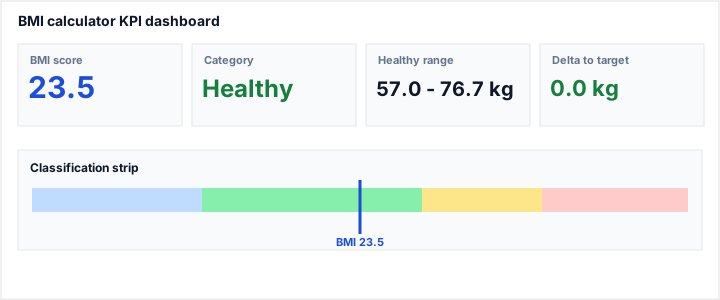
What this shows: BMI score, category band, and practical distance to healthy-weight range.
Assumptions: adult screening context, measured height and weight, no edema/pregnancy adjustments.
Representative output: BMI 23.5 in healthy range with a near-zero delta to target.
KPI dashboard and analytical charts
The dashboard answers four clinical-style questions quickly: where your BMI currently sits, how stable the category is under modest weight shifts, what healthy-weight interval matches your height, and what short-term actions most likely reduce risk.
- BMI score: absolute position in the screening spectrum.
- Category: underweight, healthy weight, overweight, or obesity segment.
- Healthy range: unit-aware target interval derived from height.
- Delta to healthy: immediate magnitude required to re-enter target range.
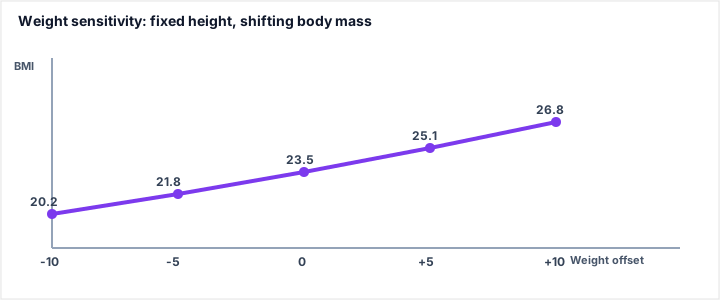
What this shows: weight shifts of ±5 to ±10 units can move classification boundaries materially.
Assumptions: fixed height, fixed unit system, all other health indicators unchanged.
Representative outputs: risk crossing often occurs near BMI thresholds 25 and 30.
Measurement protocol for reliable inputs
The arithmetic is straightforward; the quality of your measurement protocol determines whether the output is actionable. Use the same conditions across repeat checks so trend lines mean something.
- Height: stand tall without shoes, heels together, flat floor; avoid tipping the chin or rounding the spine.
- Weight: place the scale on a hard, level surface; weigh with minimal clothing when practical.
- Consistency: compare morning-to-morning or evening-to-evening rather than mixing times of day.
- Units: confirm Metric versus Imperial before reading deltas—unit drift is a frequent source of false alarms.
Worked example and validation checks
Example (metric): 72 kg and 175 cm gives BMI around 23.5, which sits in the healthy band. In this case, the healthy range KPI should be close to current weight and the delta should remain near zero. If those outputs disagree materially, re-check unit selection and input typing before interpretation.
Pro workflow: measure weight and height first, lock unit system, calculate once, then click ANALYZE with AI for contextual risk framing. Avoid making health decisions from BMI alone.
Risk context and known limits
Body Mass Index is a screening proxy, not a direct adiposity or diagnosis metric. It does not fully capture visceral fat, muscularity, edema, hydration shifts, pregnancy, or fat distribution patterns. Use it with broader metabolic context.
- Combine BMI interpretation with waist metrics and longitudinal trend, not one-off values.
- Consider population-specific thresholds where local medical guidance recommends adjustments.
- Escalate to clinician review when BMI trend and symptom profile diverge.
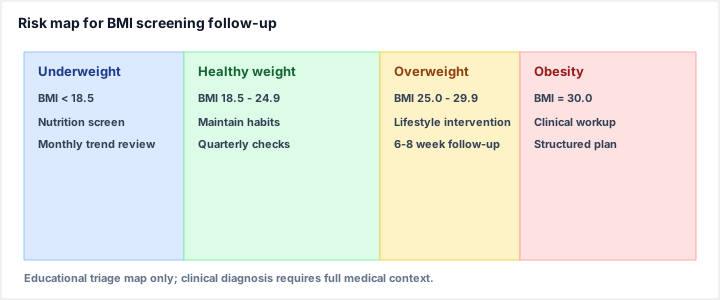
What this shows: BMI zones mapped to suggested screening urgency and follow-up depth.
Assumptions: educational triage only, not diagnosis.
Representative plan: monitor monthly trend and re-check after nutrition/activity changes.
AI Deep Review for this BMI Calculator
The AI Deep Review block uses Gemini for contextual analysis of your entered values and computed outputs. It runs only when you click ANALYZE with AI, so you stay in control of when interpretation is requested.
Use the review to translate numbers into concise risk framing, practical cautions, and next-step prompts. It is not a substitute for individualized medical advice, but it can accelerate structured thinking after you have verified inputs.
How the Gemini request is routed
The on-page review calls your deployed Gemini integration server-side, preferring fast flash-class models (including gemini-1.5-flash when the API lists it) and stepping through other generate-capable models if needed. Nothing runs until you explicitly trigger analysis, which keeps noise low and respects a deliberate workflow.
Athletic build, clinical nuance, and research literacy
Strength-trained adults often present with BMI values that sit above the healthy band while maintaining favorable metabolic markers. Conversely, “normal” BMI does not rule out elevated visceral adiposity. Treat the calculator as a structured prompt: if the number surprises you, widen the evidence base before you change behavior.
For composition depth, pair screening with body fat estimation tools and trend-friendly metrics such as waist circumference. For energy balance planning after classification, route through calorie targets only after you validate assumptions with a clinician or dietitian when medical conditions apply.
Trend interpretation and next steps
A single BMI snapshot is less informative than direction of travel. If you are monitoring progress, prioritize repeatability of measurement and look for sustained movement across weeks, not day-to-day noise from hydration or training load.
When to seek in-person evaluation
Consider clinical follow-up if BMI sits in overweight or obesity ranges alongside symptoms such as progressive dyspnea, chest pain, uncontrolled hypertension, polyuria, or rapid unintentional weight change. Screening tools cannot replace physical examination and indicated testing.
Related calculators and internal links
- Health calculators for nutrition targets after BMI screening.
- Browse all tools for better composition context.
- Ideal weight planning for realistic target ranges.
- Health Calculator category to continue risk and lifestyle assessment.
Frequently Asked Questions about BMI Calculator
How does this BMI calculator compute the score?
For metric inputs, BMI = weight(kg) / height(m)^2. For imperial inputs, values are converted first, then the same formula is applied.
Does BMI diagnose disease?
No. BMI is a screening indicator. Clinical diagnosis requires broader context such as body composition, labs, blood pressure, and medical history.
Why can athletic users get high BMI?
BMI does not separate fat and lean mass. Higher muscle mass can raise BMI without implying the same metabolic risk profile.
What does healthy-weight range mean here?
It is the body-weight interval that corresponds to BMI 18.5 to 24.9 at your current height. It is a planning range, not a strict target.
How should I use the AI deep review?
Click ANALYZE with AI after you settle your inputs. It summarizes risk context and practical next steps. Treat it as educational guidance, not medical advice.
Can children use this adult BMI tool?
This implementation is for adults. Pediatric BMI assessment requires age- and sex-specific percentile charts.