Investment Calculator
Test different growth, deposit, and return assumptions to see how your plan may change over time, then choose a strategy that fits your goals with more confidence.
Compound growth formula
*Approximation: (FV ÷ total contributed)^(1/t) − 1. Not identical to IRR or money-weighted return when cash flows vary.
Runs only when you click Analyze, then reviews input quality and output realism.
Same horizon and compounding; rate or contribution overrides as labeled.
| Scenario | Final value | Profit | vs base |
|---|---|---|---|
| Base case | $331K $ | +$191K $ | — |
| Conservative (−2% p.a.) | $256K $ | +$116K $ | -22.7% |
| Aggressive (+2% p.a.) | $432K $ | +$292K $ | +30.3% |
| Higher monthly (+50%) | $458K $ | +$258K $ | +38.3% |
| Month | Opening | Deposit | Interest | Ending balance |
|---|---|---|---|---|
| Year 1 | ||||
| 1 | 20,000 | 500 | 113 | 20,613 |
| 2 | 20,613 | 500 | 117 | 21,230 |
| 3 | 21,230 | 500 | 120 | 21,850 |
| 4 | 21,850 | 500 | 124 | 22,473 |
| 5 | 22,473 | 500 | 127 | 23,100 |
| 6 | 23,100 | 500 | 131 | 23,731 |
| 7 | 23,731 | 500 | 134 | 24,365 |
| 8 | 24,365 | 500 | 138 | 25,003 |
| 9 | 25,003 | 500 | 141 | 25,644 |
| 10 | 25,644 | 500 | 145 | 26,289 |
| 11 | 26,289 | 500 | 149 | 26,938 |
| 12 | 26,938 | 500 | 152 | 27,590 |
| Year 2 | ||||
| 13 | 27,590 | 500 | 156 | 28,246 |
| 14 | 28,246 | 500 | 160 | 28,906 |
| 15 | 28,906 | 500 | 163 | 29,569 |
| 16 | 29,569 | 500 | 167 | 30,236 |
| 17 | 30,236 | 500 | 171 | 30,907 |
| 18 | 30,907 | 500 | 175 | 31,582 |
| 19 | 31,582 | 500 | 179 | 32,261 |
| 20 | 32,261 | 500 | 182 | 32,943 |
| 21 | 32,943 | 500 | 186 | 33,629 |
| 22 | 33,629 | 500 | 190 | 34,320 |
| 23 | 34,320 | 500 | 194 | 35,014 |
| 24 | 35,014 | 500 | 198 | 35,712 |
| Year 3 | ||||
| 25 | 35,712 | 500 | 202 | 36,414 |
| 26 | 36,414 | 500 | 206 | 37,119 |
| 27 | 37,119 | 500 | 210 | 37,829 |
| 28 | 37,829 | 500 | 214 | 38,543 |
| 29 | 38,543 | 500 | 218 | 39,261 |
| 30 | 39,261 | 500 | 222 | 39,983 |
| 31 | 39,983 | 500 | 226 | 40,709 |
| 32 | 40,709 | 500 | 230 | 41,439 |
| 33 | 41,439 | 500 | 234 | 42,174 |
| 34 | 42,174 | 500 | 238 | 42,912 |
| 35 | 42,912 | 500 | 243 | 43,655 |
| 36 | 43,655 | 500 | 247 | 44,402 |
Example: compound vs simple (fixed principal)
Compare compound vs simple interest over 30 years on a lump-sum starting balance with no extra contributions. The amount shown matches typical scale for your locale.
How to use this investment calculator
Enter numbers top to bottom, then read KPIs and visuals. Below: what each control means, how to type inputs safely, and what to double-check before trusting a headline figure.
Example (realistic defaults)
These mirror plausible retail scales for your locale. Reset reloads the same kind of sample principal, monthly deposit, rate, and horizon the widget uses on first load.
- USD-style run: $25,000 starting balance, $400 per month, 6.50% nominal APR, monthly compounding, 18-year horizon — typical long-horizon brokerage or workplace plan math.
- Euro-style run: €15,000 lump sum, €250 per month, 5.50% nominal, quarterly or monthly compounding (match your fund factsheet), 15-year horizon — conservative growth assumption for planning.
- After editing, open the amortization tab to verify a few early rows match how your institution credits interest; the headline future value is only as good as frequency and rate inputs.
Fields and controls
- Compounding frequency (Year / Quarter / Month / Day)
- This tells the engine how often the quoted nominal rate is applied inside the year. Match the product disclosure: money-market and savings accounts often credit monthly or daily even when marketing copy says “X% APY.” If you are unsure, monthly is a reasonable first pass for many retail funds.
- Initial capital (P)
- The lump sum already invested at the start. Enter whole currency units; the field accepts locale-style thousands separators. Use zero only if the plan is purely periodic savings with no starting balance.
- Monthly contribution
- Recurring deposit amount each month. Set to zero for a one-time investment. Align this with what you can actually automate (payroll, standing order)—the schedule assumes the same deposit every month for the whole horizon.
- Annual rate (r)
- Nominal annual percentage before inflation unless you deliberately model a “real” return elsewhere. Stay within the slider’s allowed range; extreme values are blocked to reduce accidental typos.
- Timeframe (years)
- Investment horizon in full years. The range slider snaps to integer years—if you need month-level precision for a short goal, use the amortization tab and read monthly rows instead of relying on the headline FV alone.
- Reset
- Restores compounding to annual, reloads locale-typical sample amounts for principal and monthly deposit, and resets the year count. Use it when you want a clean baseline after experimenting.
Reading the results
- KPI rowScan invested total, ending balance, profit, ROI on contributions, a coarse annualized yield, and the share of ending balance from interest before opening charts.
- ChartsGrowth vs deposits, composition of balance, early-month interest bars, and scenario curves. Together they show pace, structure, and sensitivity—not just a single headline number.
- Scenario table and amortizationThe table compares ending values under alternate rate and savings assumptions. Monthly and yearly schedules let you audit cash flow period by period.
- Example block and floating buttonsThe compound-vs-simple example uses a separate lump-sum assumption—open it to compare curve shapes. Corner buttons jump to the chart grid or the schedule on long pages.
Important checks when entering data
- Locale matters for decimals: comma-decimal locales expect commas for cents; do not mix styles in one field.
- One constant nominal rate across the whole horizon is a simplification—laddered products or floating rates will diverge.
- Returns ignore taxes, platform fees, and inflation; subtract those mentally or in a separate sheet before committing capital.
Defaults match plausible scales for your language; adjust any field. Outputs are educational projections only.
How this investment calculator supports your financial planning
If you are sizing a long-term portfolio or a recurring savings plan, you need more than a single “future value” figure. This investment calculator lets you stress compound interest, interpret return on investment (ROI) against what you actually deposited, and layer scenario comparison on top of a disciplined monthly contribution assumption. The workspace below adds a KPI dashboard, supporting charts, and a line-by-line amortization schedule so you can reconcile each period in your own language and currency context. For debt-side planning in the same locale, pair projections with a loan calculator or mortgage-style repayment so cash-flow assumptions stay consistent. Illustrative figures round to the nearest dollar for clarity; always cross-check against the live calculator output before relying on any number in a memo or client deck.
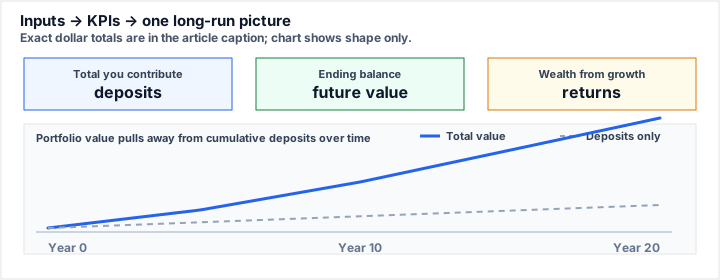
What this shows: the tool surfaces how much you put in, where you land, and how much of the ending balance came from growth, then plots the classic “two lines diverge” curve (total value vs deposits only).
Assumptions (USD-style example): $20,000 starting balance, $500 per month, 7.00% nominal APR, monthly compounding, 20-year horizon.
Representative outputs: ending balance ≈ $312,480; cumulative deposits $140,000; growth from returns ≈ $172,480 — match these in the live calculator before citing them.
Compound growth, nominal rates, and compounding frequency
The engine uses your nominal annual rate and compounding frequency to grow the balance each period, then applies your recurring deposit in line with the same schedule used in typical DCA (dollar-cost averaging) models for retirement and brokerage accounts.
Nominal vs. real: the quoted APR is nominal unless you explicitly model inflation elsewhere. When you compare products, also look at the effective annual rate (EAR) implied by compounding cadence—two accounts advertising the same headline rate can differ slightly once interest credits more often than once per year.
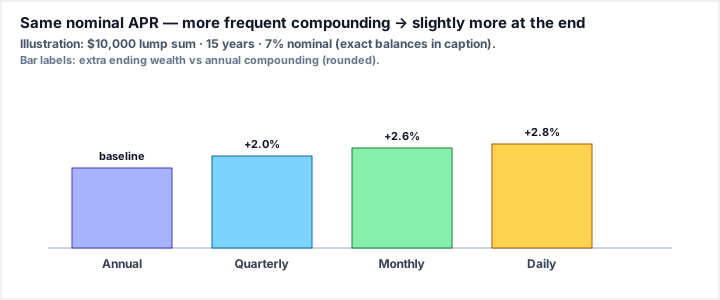
What this shows: with the same nominal rate and horizon, crediting interest more often slightly raises the ending balance. Labels on the bars are approximate % uplift vs annual compounding (not the APR itself).
Assumptions: $10,000 lump sum, no further contributions, 15 years, 7.00% nominal APR held constant across frequencies.
Ending balances (illustrative): annual $27,590 · quarterly $28,138 · monthly $28,309 · daily $28,359. Monthly beats annual by about $719 here — your live run may differ slightly after rounding.
Why compounding frequency still matters
For the same quoted APR, more frequent compounding increases the effective yield. Use the controls above to match your fund factsheet or bank disclosure before relying on any projection.
- Match frequency to the product disclosure (daily sweep vs monthly credit).
- Keep contributions consistent with how you actually invest (monthly payroll, etc.).
KPI dashboard
The KPI dashboard summarizes ending balance, cumulative deposits, ROI on contributions, a simplified annualized figure, and how much of the final value came from interest. The growth vs contributions chart shows the widening gap over time; composition splits deposits and accumulated returns; monthly interest highlights early acceleration; scenario comparison overlays conservative, aggressive, and higher-savings tracks.
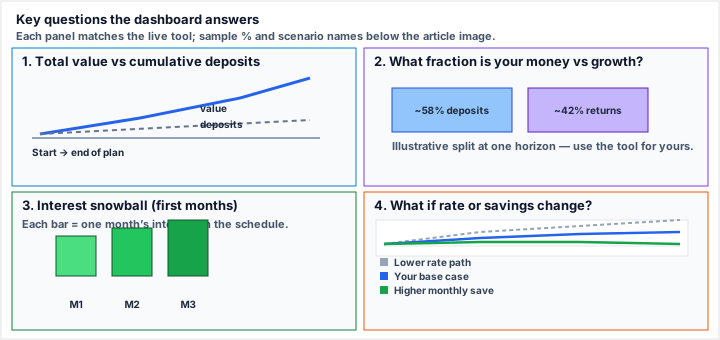
What this shows: (1) gap between account value and what you contributed, (2) how much of the ending balance is principal vs accumulated return, (3) that monthly interest tends to climb early in the plan, (4) side-by-side stress tests (lower rate, base, higher savings).
Sample numbers (one USD-style run): long-run balance ≈ $485k on the growth view; composition ≈ 58% deposits / 42% returns; month-12 interest ≈ $1,842 in the early-month bar strip.
Scenario endpoints (illustrative): base ≈ $312k; +1% rate path ≈ $348k; −$100/month path ≈ $268k — always read the scenario table in the widget for your inputs.
Amortization schedule and cash-flow transparency
Switch between monthly rows (opening balance, deposit, interest, closing balance) and a yearly summary to validate numbers the same way you would read a schedule—here tuned for wealth accumulation. Pair that review with future value and finance calculators in this locale for a fuller picture.
- Audit trail: export mentally to a spreadsheet by copying a few periods and reconciling interest factors against your fund’s disclosure.
- Limits of the model: constant rate and fixed contributions ignore sequence-of-returns risk, taxes, and fees—use the output as a baseline, not a forecast of realized wealth.
AI Deep Review: when it runs and how requests are routed
The AI Deep Review panel sits under the KPI row and does not run automatically when you type or drag sliders. Trigger it only after your inputs and headline outputs look stable—then use the review to sanity-check plausibility, flag aggressive assumptions, and surface wording you might want to tighten before sharing a screenshot or PDF with a client or family member.
On-demand analysis
Each run sends a compact summary of your scenario (amounts, horizon, compounding choice, and key outputs) to the server so the model can respond with structured bullets—risks, strengths, and caveats—without blocking the main thread in your browser. If a request fails, retry after a short pause; rate limits and network blips are handled like any other API call.
Model preference
The backend prefers Gemini 1.5 Flash for low-latency, deterministic-feeling commentary on calculator outputs. Heavier models are not required for this use case: the goal is a fast second opinion on input quality and output realism, not portfolio optimization or tax advice.
Related calculators and internal resources
Use crawlable anchors in this locale to connect this investment calculator to the rest of the site — including tools that complement growth modeling:
- Browse tools — quick checks on rates, discounts, and allocation splits before you lock inputs here.
- More calculators — contrast business margins with long-term portfolio projections.
- Loan calculator — balance investable cash flow with repayment schedules.
- Finance calculators category — browse ROI, savings, and related utilities as they ship.
- HTML sitemap — structured index for users and crawlers.
- Trust Tool home — return to the hub without losing your locale prefix.
- FAQ (below) — compound interest, ROI vs yield, scenarios, and disclaimers, with FAQ structured data for search.
Disclaimer: Outputs are educational projections only. Taxes, fund fees, inflation, and market volatility are not modeled exhaustively. Speak with a licensed advisor before acting on any result.
Frequently Asked Questions about Investment Calculator
How does this investment calculator compute compound interest?
Each period your balance grows using a factor derived from the nominal annual rate and your compounding frequency (annual, quarterly, monthly, or daily). Your recurring contribution is then applied in the same step order used in many retirement and DCA spreadsheet templates.
What is the difference between ROI and the annualized yield shown?
ROI on contributions is total profit divided by everything you invested. The effective annualized yield is a simplified (FV ÷ total contributed)^(1/years) − 1 figure. It is useful for intuition but is not the same as IRR or a full money-weighted return when cash flows change over time.
Can I see a full amortization-style schedule?
Yes. Use the Monthly tab for opening balance, deposit, interest, and closing balance per month, or switch to Yearly summary for deposits, interest, and ending balance by calendar year.
What do the scenario comparison lines represent?
They keep your horizon and compounding the same while varying assumptions: a lower rate (conservative), a higher rate (aggressive), and a 50% higher monthly contribution. Compare ending balances and the scenario table for quick sensitivity analysis.
Is this tool financial advice?
No. Trust Tool provides educational projections only. Taxes, fees, inflation, and market risk can change real outcomes. Consult a licensed professional before making investment decisions.
Are the formulas verified?
The math follows standard nominal APR compounding with periodic contributions. The on-page formula section documents the symbols so you can cross-check in Excel or another calculator.