Slug Generator
Turn long headlines into short, readable URL paths so people trust your links in search, analytics, and social previews—and you ship pages faster without second-guessing every character.
使用された公式
作業中の見出しを貼り付け — ツールは句読点を削除し、トークンの途中で区切らずに長さを制御します。
AIディープレビュー
ANALYZEをクリックすると実行。オプションと計算されたスラッグをGeminiに送信し、構造化された編集フィードバックを取得。
長さ vs 上限
許容されたパス予算のうちスラッグが使用する割合。
セグメント長
区切り文字間のトークンごとの文字数(最初の6つ)。
パス明瞭度スコア
長さとセグメント数からのヒューリスティック0–100(編集補助)。
このスラッグ生成器の使い方
見出しまたは作業タイトルを貼り付け、ハイフンまたはアンダースコアを選択し、文字上限を設定し、一般的なストップワードを削除するかどうかを判断し、KPI行とチャートを確認。ANALYZEをクリックした場合のみAIディープレビューを実行。
フィールドとコントロール
これはURLエンコーディング前のソース文字列です。マーケティング句読点は削除され、単語は英数字境界で分割されるため、全角ダッシュや括弧がパスに漏れません。
ハイフンは読みやすいパスのパブリックウェブデフォルト。アンダースコアはレガシーシステムやエクスポートで有用 — パターンをサイト全体に採用する前に両方比較。
トークンは次が上限を超えないまで左から右に追加されるため、単語の途中で切断されることはありません。長い商品名には上限を上げ、コンパクトに保つカテゴリハブには下げてください。
「the」「and」などのトークンを削除するとパスが短くなりますが、意味が消える場合があります(「bank」vs 「the bank」)。残りのトークンがサイトマップで一意に読める場合のみ有効化。
小文字は大文字小文字敏感サーバーでの重複パスを回避し、アナリティクスで見栄えが良くなります。ブランドトークンを正確にミラーリングする必要がある場合のみケースを保持。
KPI行の読み方
- 元の文字数トリム後にどれだけの見出しを投入したかを表示 — CMSタイトルフィールド vs オンページH1テキストの比較に便利。
- スラッグ長とセグメント長さは最終パス文字列。セグメントは区切り文字間のトークンをカウントし、詰め込みすぎたパスを特定できます。
- パス明瞭度スコア中程度のパスと適切な数のセグメントを好むヒューリスティック — ランキングスコアではありません。
- 切り捨てフラグ上限が次の完全なトークンの追加を阻止した場合に点灯 — 上限を上げるか見出しを短くしてください。
電卓下のライブチャート
- 長さ vs 上限 — 使用された文字予算の割合を表示。
- セグメント長 — シノニムが必要な可能性のある異常に長いトークンを表示。
- パス明瞭度ゲージ — ヒューリスティックスコアのクイックビュー。
AIディープレビュー
ANALYZE後のみ実行。オプションと計算されたスラッグをGeminiに送信し、明瞭度、切り捨てリスク、区切り文字選択に関する構造化されたコメントを取得。
公開前に確認すべき重要なチェック
- スラッグがCMSで一意であり、アーカイブされた投稿と衝突しないことを確認。
- スラッグの意図をH1とパンくずリストに一致させ、アナリティクスチャネルが合致するように。
- 公開後の頻繁なリライトは避ける — リダイレクトは管理可能ですが大規模では高コスト。
例(サンプルなし)
空のタイトルフィールドから開始 — 見出しを貼り付けるとスラッグ、KPI、チャートがライブ更新。クリアはタイトルボックスを空に;区切り文字、上限、オプションは設定通りに維持。
- 事前入力サンプルテキストなし — 独自の見出しを入力してツールを試用。
- クリアはタイトルフィールドのみをクリア。
- デフォルト上限72文字、ハイフン区切り文字。
Why clean URL slugs still earn their place in professional SEO programs
This slug generator turns messy headlines into stable, human-readable paths you can paste into a CMS, share in decks, and read inside analytics without decoding percent-strings. Slugs do not replace strong content or technical health, but they reduce friction: editors agree on a single string, social previews look intentional, and crawl logs become easier to scan when directories follow a predictable vocabulary.
The live workspace pairs deterministic rules—diacritic stripping, token boundaries, optional stop-word removal, and a hard character cap that never slices mid-token—with KPIs and charts so you can see length, segment mix, and a planning-oriented clarity score before you touch publish. When you need a second opinion, AI Deep Review adds structured commentary after you click ANALYZE.
Think of slugs as part of your information scent stack: the path should reinforce what the page delivers, stay distinct inside your content graph, and remain legible when copied into email or Slack. That is different from chasing a mythical “perfect keyword slug,” which often produces stiff, repetitive paths across a site. Better discipline is to keep tokens short, avoid redundant category stuffing, and align the slug with the primary topic named in the title and H1 without parroting every function word.
Slugs also intersect with measurement. Campaign UTM parameters come and go, but the path persists in analytics exports, log files, and rank-tracking snapshots. When paths are readable, analysts spot duplicate or near-duplicate routes faster, and content audits become less dependent on memorized post IDs. Pair slug work with a keyword density checker pass when you are validating how often a head term appears in the body, and use a word counter when titles or meta descriptions must fit platform limits—those tools answer different questions than the path string, but they keep the same editorial standards honest.
For long-form pages, also run the reading time calculator so scheduling, audio scripts, and stakeholder expectations match the real minutes on the page. If you are importing outlines from messy docs, normalize spacing with remove extra spaces before you measure anything, and use sort text lines when you are reorganizing bullet lists exported from research notes.
Inputs, separators, and caps that teams actually debate
Headline source should be the same string your CMS title field will store, not a shortened social variant. If the marketing title includes a year, product codename, or legal qualifier, decide whether that token belongs in the permanent path or only in the visible headline. Paths that change every quarter train users and crawlers to expect churn; paths that freeze early but drift from the on-page promise create cognitive dissonance in analytics.
Character cap is a guardrail, not a target. Many teams aim for concise paths in the mid dozens of characters because they fit reporting columns and still leave room for nested directories. This tool enforces the cap by dropping later whole tokens, so you see a boolean truncation flag instead of awkward half-words.
Stop-word removal is off by default. Turning it on can help when a title is padded with function words but the remaining tokens are still unambiguous inside your site. If removal yields a generic stem shared by multiple articles, keep the stop words or add a distinguishing token.
Hyphens, underscores, and cross-team readability
Hyphenated paths usually read more naturally in browser chrome and search snippets because spaces render as visible breaks. Underscores can still appear in exports, feeds, or older templates; switching midstream without redirects fragments history. Pick a house standard, document it in your content ops guide, and regenerate slugs with the same separator when you localize or republish.
KPI dashboard, charts, and how to read them without overfitting
The KPI row summarizes source length, slug length, segment count, truncation state, active cap, and a 0–100 path clarity heuristic derived from length and segment count. It is meant for editorial triage: unusually short paths may be vague, while very long paths with many segments can signal keyword stuffing or a headline that never received a final tighten. The in-widget charts visualize length versus cap, per-segment character lengths, and the clarity score so you can screenshot a before-and-after when stakeholders ask why a path changed.
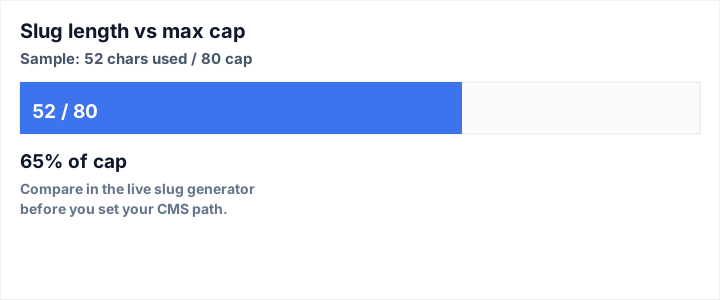
What this shows: how much of a chosen character budget a sample slug consumes—useful when standardizing caps across sections.
Assumptions: illustrative 52 characters used out of an 80 character cap (65%).
Representative outputs: run your headline in the live tool to match your CMS limits.
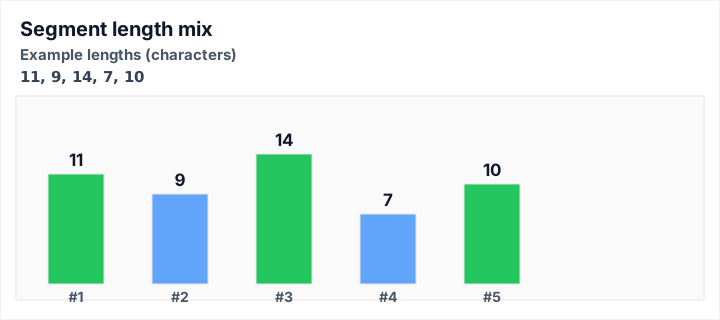
What this shows: whether any single token dominates the path—often a sign you need a shorter synonym or split across a parent/child URL pattern.
Assumptions: static example lengths 11 · 9 · 14 · 7 · 10 characters.
Representative outputs: compare against the segment bars rendered for your live slug above.
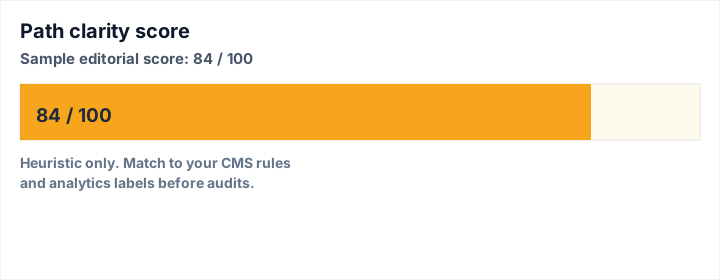
What this shows: a quick heuristic score for path readability relative to length and segment mix.
Assumptions: illustrative score 84 on a 0–100 scale.
Representative outputs: verify against the score in the calculator before citing in audits.
Workflow notes when slugs sit next to structure experiments
Editors sometimes mirror headline experiments in sandbox files. If you are testing reversed strings or mirrored copy for QA, the reverse text utility keeps those checks separate from production slugs. After structural edits, regenerate the slug from the final approved headline rather than hand-editing the path to match an abandoned draft—hand edits hide the reasoning future maintainers need.
Localization adds another layer: translated titles may produce different token counts under the same cap. Re-run this generator per locale instead of transliterating an English slug when the localized headline diverges materially. Keep hreflang pairs aligned at the page level; the localized slug should still describe the localized content.
Depth, honesty, and what slugs cannot fix
Slugs do not repair thin content, slow pages, or weak internal linking. They also do not replace canonical tags, XML sitemaps, or careful redirect maps when URLs must change. Treat this tool as a clarity and consistency layer: it helps teams agree on a string that behaves well in analytics and human communication, while the broader SEO program still needs crawl budget discipline, structured data where appropriate, and pages that answer intent completely.
When AI review is enabled, treat it as structured editorial guidance, not a verdict from search engines. It may flag over-short paths, aggressive stop-word stripping, or separator choices that confuse non-technical reviewers—exactly the sort of friction that slows launches when caught late.
Accuracy and limits of the deterministic engine
The slug engine uses Unicode normalization and Latin diacritic stripping tuned for common English editorial inputs. Rare scripts or mixed-language titles may need manual review in your CMS. Reserved characters, unicode homoglyphs, and platform-specific length rules still belong to your deployment checklist—the generator focuses on tokenization, casing, separators, and caps so you can iterate quickly before those final checks.
Related tools and internal resources
- Keyword Density Checker — align visible copy emphasis with the topic your slug promises.
- Word Counter — validate length limits for titles, metas, and body sections.
- Reading Time Calculator — translate word counts into realistic reader minutes.
- Remove Extra Spaces — clean pasted copy before measuring or publishing.