Case Converter Online
Free online case converter: sentence, title, UPPER, lower, capitalized, alternating & inverse case—plus trim and acronym-safe options. Private in-browser...
Tip: sentence/title are best for publishing copy, while alternating/inverse are useful for social and testing workflows.
Visual Diff Viewer
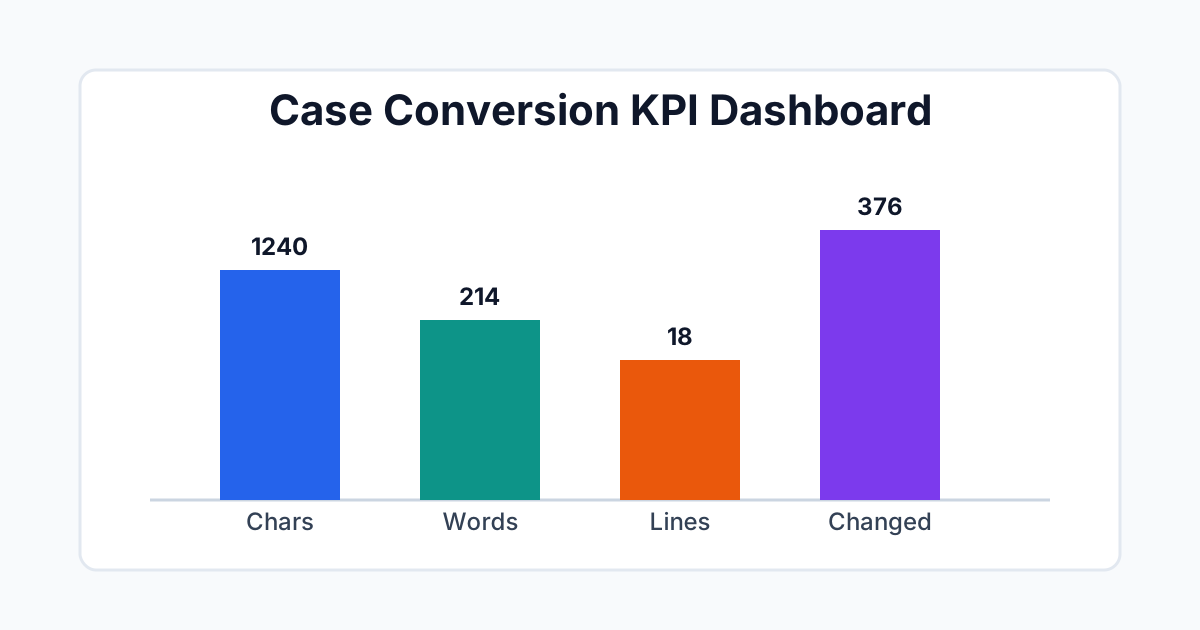
Case-conversion dashboard (with numeric labels)
Recent operations
No operations yet.
ケースコンバーターの使い方
ケースコンバーターは、コピーやUI文字列を公開したり、コード識別子を扱うチームのためのテキストワークフローツールです。不統一な大文字小文字は単なるタイポであることは rare で、通常はテキストが異なるソース、ツール、または著者から来たことを示すシグナルです。このセクションでは、意図的に大文字小文字を変換し、出力を検証し、結果を編集またはエンジニアリングパイプラインの残りに接続する方法を説明します。
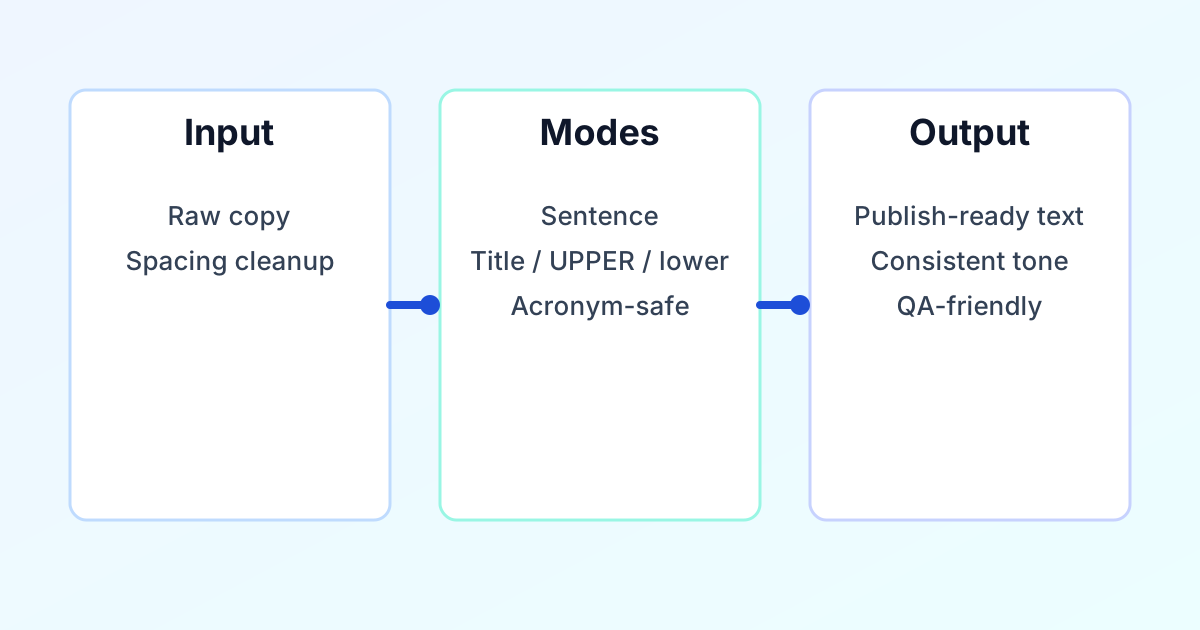
ソーステキストを貼り付けまたは入力し、宛先に適合するターゲットケースモード(見出し、段落、スラッグ、または識別子)を選択し、出力パネルを確認してからコピーまたはダウンロード。長い原稿の場合は、見出し、本文、ラベルが別々のルールを維持できるようにセクションごとに作業。
- ソースを準備。見出しブロック、段落、ラベルのリスト、または識別子のセットを修正しているかを決定。1つの貼り付けで混合コンテンツを含む場合は、分割が必要な場合が多い。
- モードを選択。スタイルガイドに合わせる:プロスの見出しまたはタイトルケース、正規化の大文字または小文字、特別なレイアウト用の大文字化または交互、以及QAチェック用の反転 — コードスタイルの識別子が異なるパスを必要とする場合はエディタで微調整。
- 必要に応じて詳細オプションを適用。略語を保持、行端をトリム、または繰り返しスペースを折りたたんで、変換が乱れた入力と戦わないように。
- KPIと差分で検証。変更された文字数とビジュアル差分をCMS、IDE、またはスプレッドシートに貼り付ける前のクイックサンティティチェックとして使用。
- ツールをチェーン。大文字小文字が安定したら、以下のセクションでリンクされているコンパニオンツールで長さチェックとURLのクリーンアップを続ける。
What this free online case converter does
A case converter (also called a text case converter or change case tool) reformats capitalization so your copy matches editorial rules or UI patterns. Here you can switch between sentence case, title case, UPPER CASE, lower case, capitalized words, alternating letters, and inverse case—useful for headlines, body paragraphs, labels, and quick experiments before you paste into a CMS or design file.
For URL paths and code-style identifiers (camelCase, snake_case, kebab-case), pair lowercased output with our Slug Generator or your team’s naming rules after case is clean. This page targets content, SEO, and product teams who want a repeatable workflow: prepare text, pick the mode, verify with KPIs and diff, then publish—without retyping long blocks by hand.
Why case conversion matters for content quality
Letter case is a structural cue. Readers use capitalization to infer hierarchy (headline versus body), emphasis (labels versus prose), and trust (polished versus rushed). In product and marketing copy, inconsistent case undermines the sense that a page was reviewed as a single system.
For engineering, case is part of the contract: APIs, components, and configuration keys are often case-sensitive. A batch rename that ignores naming rules creates churn in code review and increases the risk of subtle bugs. Treating case conversion as a controlled step—rather than manual find-and-replace—reduces that risk.
For search and sharing, stable lowercase slugs and predictable title casing in snippets help teams avoid accidental duplicates and awkward previews. The goal is not decorative uniformity; it is predictable behavior across channels.
Case formats at a glance
UPPER CASE suits short warnings, acronyms, or single-line emphasis. Avoid long passages in all caps because readability drops sharply.
lower case supports normalization, imports, and slug preparation before you run a dedicated slug or URL pass.
Title Case fits many headlines and product surfaces when your style guide capitalizes major words.
Sentence case is the default for explanatory paragraphs and most long-form body copy.
Capitalized words, alternating case, and inverse case help with labels, creative layouts, and spotting stray capitalization—use them sparingly so readability stays high.
For programming identifiers (camelCase, PascalCase, snake_case) and public URLs (kebab-case), use this tool to normalize plain text first, then apply language-specific naming rules—or build slugs with the Slug Generator after lowercasing.
Advanced case workflow
Professional teams rarely “fix case” in isolation. They align it with whitespace hygiene, length limits, and terminology control. A practical sequence is: normalize spacing, convert case by layer (headings separate from body), then run secondary checks.
Normalize first. If the text has irregular spaces or blank lines, clean it with Remove Extra Spaces so word boundaries stay predictable before conversion.
Convert by layer. Headings, CTA labels, metadata, and body copy often follow different rules. Applying one mode to an entire page export usually creates new inconsistencies; segment the work instead.
Verify with supporting tools. Use Word Counter when you must hit character or word budgets, Slug Generator for URL-safe strings after lowercasing, and Keyword Density Checker when editorial SEO context matters.
Organize output. For sorted inventories or columnar lists, follow with Sort Text Lines. For creative or test variants, Reverse Text can sit at the end of a pipeline after case is correct.
KPI guide
Metrics in this tool are meant for release discipline: they answer whether the transformation scope matches what you intended to change.
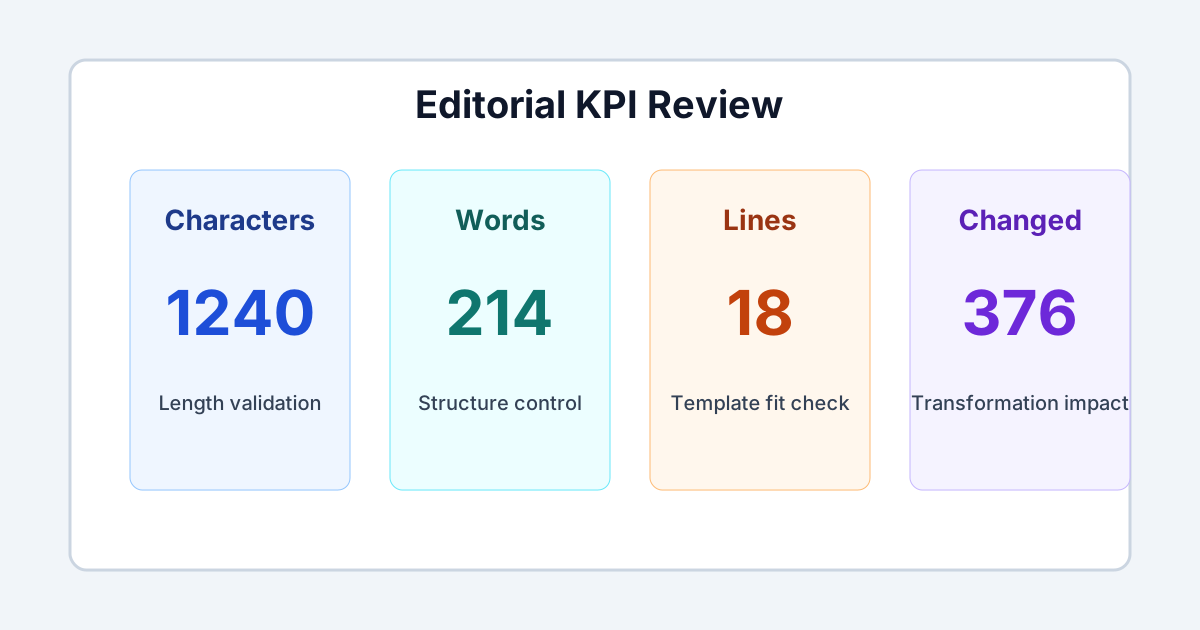
Output characters and words. Use these when titles, snippets, or UI strings must stay inside fixed limits.
Output lines. Useful when pasting into templates, CSV columns, or components that render line breaks literally.
Changed letters. A large value is expected when input was mixed case; a large value on already-clean text suggests the wrong mode or a need to normalize first.
Visual diff. Treat this as the sign-off layer: it shows exactly what moved, which is faster than rereading the entire block.
Pre-publish review
Content integrity. Confirm meaning, sentence boundaries, and punctuation still read naturally after conversion. Read a short sample aloud if the page is customer-facing—ears catch awkward capitalization that eyes skip.
Terminology and brands. Manually check acronyms (API, SEO, KPI), product names, legal disclaimers, and regulated terms; rules-based case changes should assist editors, not replace judgment.
Before you publish or merge. Paste the final text into your CMS, email client, design file, or pull request preview. Compare rendered headings and body copy against your house style on both mobile and desktop. Save or export a version after case fixes so reviewers can see the diff. For compliance-heavy or brand-sensitive assets, keep that revision history in your authoring or ticket system so audits stay traceable.
Related text tools
Word CounterSlug GeneratorKeyword Density CheckerRemove Extra SpacesRemove Duplicate LinesSort Text LinesReverse TextBrowse all text & list tools
Other language versions
EnglishEspañolPortuguêsFrançaisहिन्दीالعربيةРусскийDeutschItalianoTürkçe