Remove Extra Spaces
Corrigez les problèmes d'espacement en quelques secondes pour que votre texte soit plus propre.
Tip: uncheck Auto above for very long text, then use Remove Extra Spaces when you are ready.
Visual Diff Viewer
Whitespace Defect Dashboard (with numeric labels)
Recent Operations
No operations yet.
How to use Remove Extra Spaces
### Step 1: Paste the source text Use the left editor for your raw text. This can be article drafts, CSV exports, emails, legal text, or code snippets. ### Step 2: Cleaning behavior (defaults + optional Advanced) By default the workspace applies a sensible cleanup profile: collapse repeated spaces, trim line edges, convert tabs to spaces, collapse extra blank lines, and allow at most **one** consecutive space. Open **Advanced** (next to **Clear** on the input row) to fine-tune checkboxes and the max consecutive spaces slider. You can still change **letter case** (none / lower / upper / title / sentence) below. ### Step 3: Run clean Click **Remove Extra Spaces** (or rely on Auto-clean). The tool returns cleaned output, KPI metrics, visual diff feedback, and operation history. ### Step 4: Copy or export Use the output actions for publishing pipelines, CMS upload, or data handoff.Why this Remove Extra Spaces tool improves publishing quality
Messy whitespace silently reduces perceived quality and can break data handling. A professional **remove extra spaces** workflow improves: - Readability on mobile and tablet - Consistency across CMS editors - CSV and text parsing reliability - SEO snippet quality checks  ### Editorial quality gains #### Cleaner paragraphs and headings When spacing is normalized before publication, your text blocks render predictably in templates and social previews. #### Faster QA cycles Editors can focus on meaning and conversion message instead of repetitive formatting fixes.Advanced whitespace strategy for SEO and data quality
A high-performance content workflow uses **remove extra spaces** as an early normalization step: 1. Normalize whitespace before grammar or SEO editing. 2. Run keyword and readability checks only after cleanup. 3. Export final clean text to your CMS. This order prevents false negatives in keyword density and sentence segmentation.  ### Recommended production sequence #### For SEO pages Clean text -> refine headings -> update internal links -> verify meta snippet fit. #### For structured text data Clean text -> validate delimiters -> run schema/table imports.KPI interpretation guide
The dashboard is built for practical decisions: - **Characters removed**: total formatting noise eliminated. - **Compression ratio**: how much dead text weight was removed. - **Extra space runs**: raw spacing defects detected pre-cleanup. - **Output words and lines**: final editorial shape. 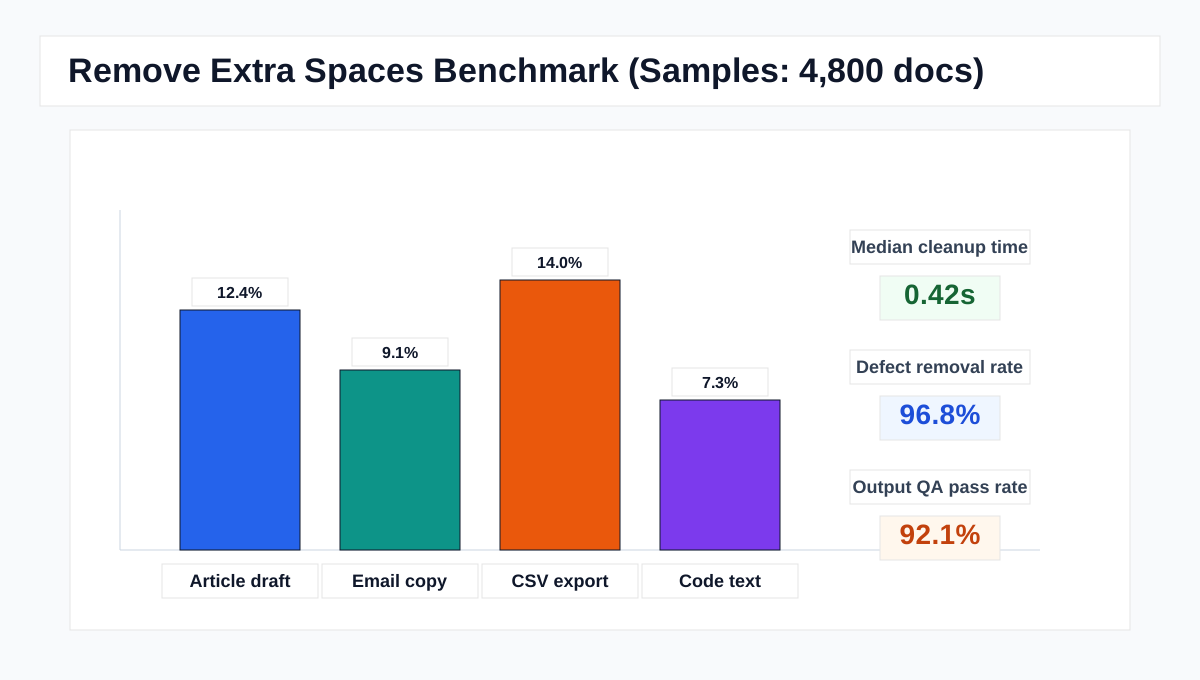Related calculators
Use these internal tools in the same workflow: - [Word Counter](/en/calculator/word-counter) - [Loan Calculator](/en/calculator/loan-calculator) - [Investment Calculator](/en/calculator/investment-calculator) - [Tools category](/en/category/tools)Other language versions
- [English](/en/calculator/remove-extra-spaces) - [Español](/es/calculator/remove-extra-spaces) - [Português](/pt/calculator/remove-extra-spaces) - [Français](/fr/calculator/remove-extra-spaces) - [हिन्दी](/hi/calculator/remove-extra-spaces) - [العربية](/ar/calculator/remove-extra-spaces)Questions fréquentes sur Remove Extra Spaces
Comment fonctionne cet outil ?
Il applique des règles déterministes de whitespace : collapse des espaces répétés, trimming des bords de ligne, conversion des tabulations, et contrôle des lignes vides.
Cela changera-t-il mon libellé ou ma signification ?
Non. Le nettoyage cible uniquement les caractères d'espacement.
Puis-je l'utiliser pour la préparation de contenu SEO ?
Oui. Normaliser le whitespace avant les modifications SEO finales améliore la cohérence des titres et la préparation des snippets.
Est-ce utile pour le CSV et le texte structuré ?
Oui. Efficace pour réduire l'espacement irrégulier dans le texte séparé par virgules ou tabulations avant l'importation.
Que montre le visualiseur diff ?
Il met en évidence les caractères d'espacement supprimés pour que vous puissiez vérifier exactement ce qui a changé.
L'outil stocke-t-il mon texte ?
Le nettoyage s'exécute dans votre navigateur. Le résultat nettoyé est généré localement.